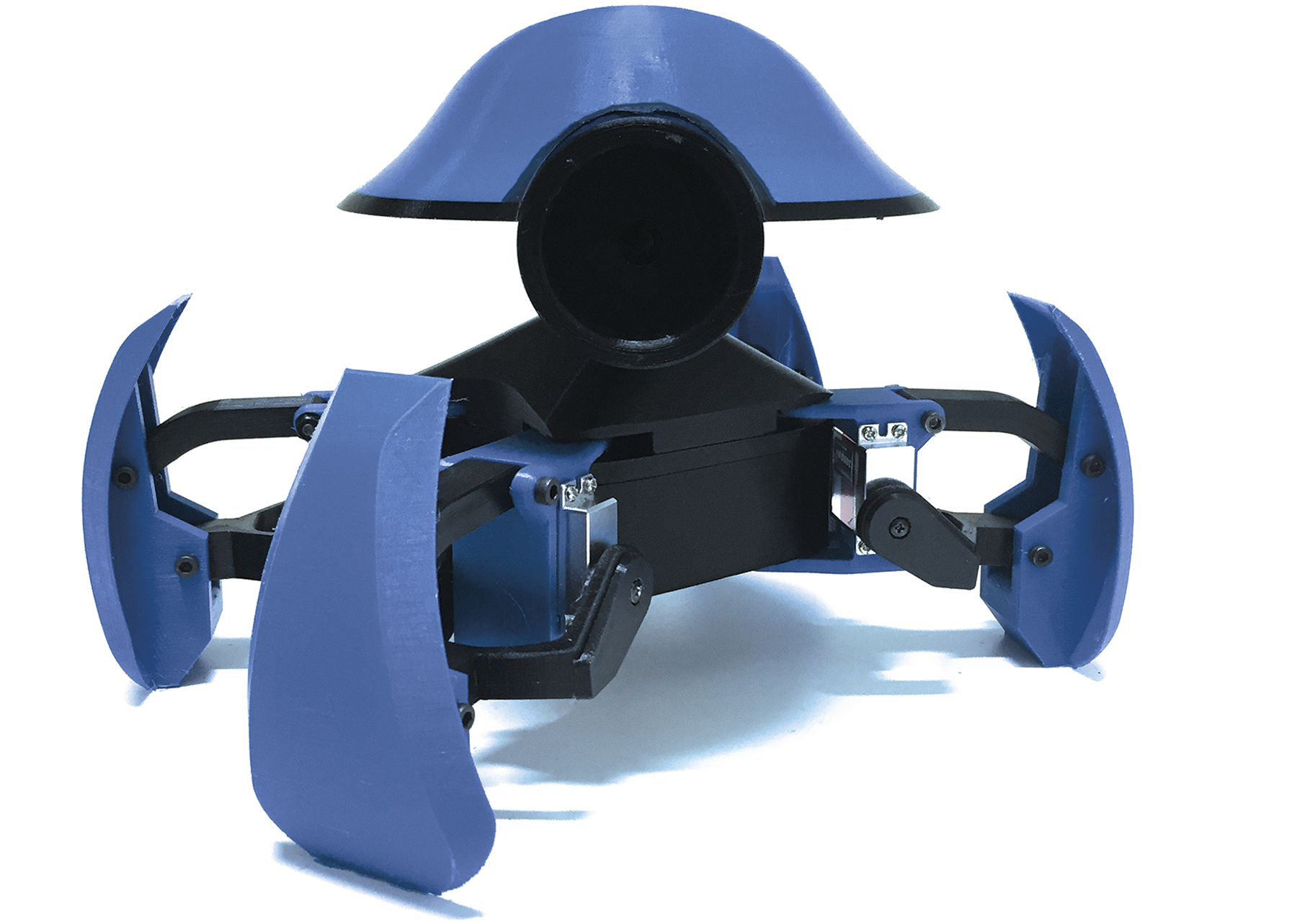
The original parts, controller structure and design decisions behind iOlly. These notes document the existing build; a complete, checked assembly guide is still to come.
Built prototype · build notes available
A starting point for understanding the build.
The 2-DOF v1 archive includes 16 STL files, component illustrations, Arduino C++ source and a working-prototype demo. It does not include a verified shopping list or a complete wiring and assembly manual.
The mechanical layout and the archived source agree on four legs with two servo channels each, plus a separate head channel. The controller software targets the ESP8266 Arduino environment.
ESP8266 / Arduino C++
The archived controller code uses the ESP8266 Wi-Fi and Arduino Servo libraries.
Eight leg-servo channels
Two driven joints per leg, arranged as an inner and outer channel on each of the four legs.
One head-servo channel
A ninth output, labelled “camera” in the source, moves the head assembly.
Printed body, legs and head
A split body shell, mirrored leg components, curved feet, spacers and a separate head assembly.
Local Wi-Fi commands
The firmware creates an access point and receives numbered movement commands over HTTP.
02 / THE MECHANICAL FILE SET
A body, four legs, and a separate head.
This is the file inventory from the packaged 2-DOF v1 STL directory. It keeps the left/right variants and the tibia print layout visible. File count is not a quantity list for printing an entire robot.
Body
Body Bottom v1.stl
Body Middle v1.stl
Body Top v1.stl
Coxa / hip joints
Coxa Left v1.stl
Coxa Right v1.stl
Femur / upper legs
Femur Top v1.stl
Femur Left Bottom v1.stl
Femur Left Bottom Cover v1.stl
Femur Right Bottom v1.stl
Femur Right Bottom Cover v1.stl
Tibia / feet
Tibia v1.stl
Tibia print v1.stl
Head
Head Base v1.stl
Head Camera v1.stl
Head Cover v1.stl
Spacing
Spacer v1.stl
“Tibia print” is a separate print-layout file, alongside the single-part tibia file. The archive also contains loose concept revisions and a v2 ZIP; their names alone do not establish a newer validated release.
The values below come from the Body12 G-code generated on 5 December 2018 with Slic3r Prusa Edition 1.41.0. They document one early body print, rather than prescribe settings for every part or a different printer.
Printer profile
Original Prusa MK2.5
Material
PLA
Nozzle
0.4 mm
Layer height
0.1 mm
First layer
0.2 mm
Infill
20%
Perimeters
2
Nozzle temperature
210 °C
Bed temperature
60 °C
04 / HOW THE CONTROL FITS TOGETHER
From a Wi-Fi command to a movement.
The original source uses an ESP8266 access point and an HTTP listener on port 80. A numbered command is passed to a dispatcher, which calls the robot’s motion routines. The main classes are named WebConnector, CommandExecutor, MiniKame and Oscillator.
01
Receive
WebConnector reads the command from an HTTP request on the robot’s local Wi-Fi network.
02
Select
CommandExecutor selects a movement or pose from the numbered command list.
03
Move
The robot and oscillator classes coordinate servo positions, timing, phase and trim.
Inspect the original nine-channel pin map +
These are the board labels recorded in minikame.cpp. They are not GPIO numbers or a complete wiring diagram. Confirm the actual board, power supply and connections before wiring hardware.
CH 0 Front left · inner
D1
CH 1 Front right · inner
D4
CH 2 Front left · outer
D8
CH 3 Front right · outer
D6
CH 4 Back left · inner
D7
CH 5 Back right · inner
D5
CH 6 Back left · outer
D2
CH 7 Back right · outer
D3
CH 8 Head · labelled camera
D0
05 / THE MOTION REPERTOIRE
Walking is only the beginning.
The archived dispatcher defines 30 numbered commands. The names below follow the actual function calls in commandexecutor.cpp, rather than the old HTML button labels. This is a reference to the code, not a claim that every routine has been re-tested.
Getting around
Walking forward and backward, turning, running and returning to a home pose.
Looking around
Directional poses, diagonal looks, and yes/no gestures.
A little personality
Hello, bye, dancing, push-ups, moonwalking and expressive poses.
The archive gives us the shape of the robot and a useful view into its original control system. A reproducible guide still needs the details between those pieces.
Confirm the hardware.Identify exact electronics, servos, battery and fasteners, with a checked quantity list.
Document assembly.Confirm the print revision and quantities, then photograph orientation, joints, servo horns and cable routing.
Check power and wiring.Produce a diagram for the actual board and servo supply, with clear first-power-on checks.
Validate the software.Review the legacy firmware, align the controls, and document calibration and tested movements.
RELEASE STATUS
Build notes now. A checked package later.
The raw STL and firmware archives are not offered as downloads here. The release contents and any price will be shown with the project once the package is ready.